



Desktop Waifu Guide: Screen Pet, AI Assistant, or Dedicated 3D Companion?
Sometimes you do not want another character app that disappears the moment you close a tab. You want the character to remain visible while you work, play, draw, or leave music running in the background. That desire is what turns a general digital waifu into a desktop waifu. The term covers three quite different experiences. A screen pet adds an animated presence to your monitor. An AI desktop assistant adds conversation and context. A dedicated 3D companion gives the character a separate place in your physical setup. The right choice depends less on which one sounds most human and more on the kind of presence, interaction, setup, privacy, and cost you are comfortable with.
What Is a Desktop Waifu?
A desktop waifu is an anime-style or custom character designed to remain visible and accessible in a desktop environment. It may sit in a transparent window, move across the screen, respond when clicked, speak through an AI system, or appear on a separate device beside the monitor.
“Desktop” describes where the character fits into your routine. It does not automatically mean generative AI, romance, or even conversation. For example, the current Desktop Waifu listing on Steam describes an offline Live2D character with rule-based reactions. That is a desktop companion, but not an AI chatbot.
This distinction matters because people searching for an anime waifu on their desktop may want anything from quiet visual company to a character that remembers previous conversations. Those experiences require different software, permissions, hardware, and budgets.
Three Ways a Waifu Can Live on Your Desktop
Screen Pet
A screen pet is the lightest option. It usually appears as a transparent animated waifu or mascot layered over the desktop. It may idle, react to clicks, change poses, or move between parts of the screen.
This format works well when visibility matters more than conversation. It can also be easier to install and less demanding on a PC. Some screen pets run entirely through predefined animation and behavior, so they may not need an account, microphone, camera, or AI service.
The tradeoff is depth. A screen pet can make a desktop feel more personal, but it may repeat the same reactions and know little about the user or the current situation.
AI Desktop Assistant
An AI desktop assistant adds a conversational layer. Depending on the project, it may support text, voice, memory, screen awareness, or a customizable personality. One open-source Desktop Waifu project on GitHub, for example, combines a VTuber-style character with voice and AI assistant features.
This format is better for someone who wants a character to answer, react, or help with simple routines. It can also offer more flexibility than a fixed screen pet. In return, it may require API setup, background services, greater PC usage, and broader permissions. The character still lives inside the computer, so closing the app or shutting down the PC removes its presence.
Dedicated 3D Companion
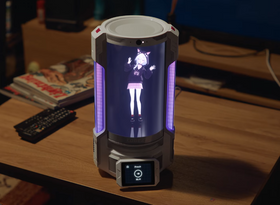
A dedicated 3D companion moves the character off the main display and onto separate hardware. The device provides its own screen, speakers, microphones, camera, and processing environment, giving the character a fixed location on the desk.
This option makes sense when physical placement is part of the appeal. The character can remain visible without covering a game, work window, or drawing canvas. The tradeoffs are a higher upfront cost, more desk space, device setup, and the need to examine how its AI and data processing work.
What Actually Changes When AI Is Added?
AI changes behavior, not just animation. A scripted character selects from reactions created in advance. An AI waifu can generate new responses, use conversational context, adapt a persona, and sometimes work with voice, memory, or visual input.
That does not guarantee better company. Generative responses can be wrong, repetitive, inconsistent with the character, or too slow for the moment. Memory may summarize important details rather than preserve every sentence forever. Screen or camera awareness also requires permissions that a simple animated waifu never needs.
Before choosing an AI-enabled option, ask where the model runs, what needs an internet connection, what information is stored, and which features stop working if the service goes offline. “AI-powered” is not a complete description of the experience.
How to Choose the Right Desktop Waifu for Your Setup
Start with the role you want the character to play. A quiet figure at the edge of the screen and a voice-enabled companion are not two versions of the same product; they solve different problems.
|
Decision factor |
Screen pet |
AI desktop assistant |
Dedicated 3D companion |
|
Presence |
On the PC screen |
On the PC screen, usually as an overlay or window |
Separate place on the desk |
|
Interaction |
Animation and scripted reactions |
Text, voice, context, and possible memory |
Voice, visible behavior, and device-based interaction |
|
Setup |
Usually light |
May require accounts, APIs, permissions, or background services |
Device, account, network, and character setup |
|
PC impact |
Usually low |
Can use more CPU, GPU, memory, or screen access |
Normal use may be independent of the PC |
|
Customization |
Character, outfit, animation, or behavior varies by app |
Persona, voice, model, and prompts may be available |
Model, persona, voice, animation, and environment vary by device |
|
Portability |
Travels with the computer |
Travels with the computer |
Requires moving another device |
|
Cost |
Often free or inexpensive |
May involve subscriptions or API costs |
Higher hardware cost |
Choose a screen pet if you mainly want ambient visibility. Choose an AI desktop assistant if conversation matters and you are comfortable managing software and permissions. Consider dedicated hardware when the character having its own physical place is central to the experience.
Can You Use Your Own Character?
“Custom character support” can mean several things. Live2D commonly describes a rigged 2D character, while VRM is a format used for 3D humanoid avatars. A product that accepts one format may not accept the other, and successful import does not guarantee that every expression, material, animation, or body type will work perfectly.
Check the required format, rig, file size, expression support, voice options, and whether the character can be given a custom persona. Rights matter too. Owning an image of an anime character does not grant permission to use its model or voice. Original, commissioned, or properly licensed assets are the safest route for a personal waifu.
Privacy, Permissions, and Practical Limits
A character that can hear, see, remember, or inspect a screen needs more access than a passive mascot. Before installing software or buying hardware, check:
- whether voice, images, or text are processed locally, in the cloud, or both;
- what the microphone, camera, and screen permissions are used for;
- how chat history, memories, recordings, and diagnostic logs are stored;
- whether data can be viewed, edited, exported, or deleted;
- whether the software starts automatically and can be fully uninstalled;
- what happens when the internet connection or provider is unavailable.
Also consider everyday friction. An always-on overlay can interfere with fullscreen apps. An AI assistant can consume system resources. A camera may be unnecessary for someone who only wants voice. The right choice is not the one with the longest feature list; it is the one whose access and maintenance requirements still feel reasonable after the novelty wears off.
When a Dedicated 3D Companion Makes Sense
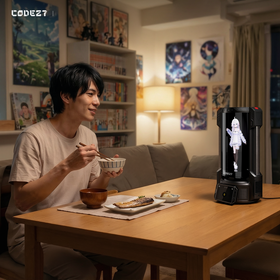
Dedicated hardware is worth considering when a separate physical presence is the point rather than a bonus. It keeps the character visible without competing for monitor space and gives the experience a consistent home on a desk, shelf, or creative workspace.
The CODE27 3D Companion Hub is one option in this category. It is designed for normal daily use without a PC or Mac connection and uses a depth-effect, holographic-like display to place a customizable character in its own visible space. It is not a true volumetric hologram.
Users can import compatible standard humanoid VRM models and adjust elements such as persona, voice style, animation, and expressiveness. Chat History, Memory, and Diary features support continuity in different ways, although memory remains bounded and Diary entries depend on meaningful interaction rather than appearing on a guaranteed schedule.
The limits are just as important. CODE27's current core AI experience requires network and cloud processing, so it is not a fully offline local-AI device. VRM support does not mean every 3D model or copyrighted anime character is technically or legally usable. It is therefore a better fit for someone who values a customizable character with its own place on the desk—not someone seeking a free overlay, a mobile-only chatbot, or a completely local setup.
Desktop Waifu FAQs
Does a desktop waifu need AI?
No. A desktop waifu can be an animated or rule-based screen pet. AI is only needed when the experience includes generated conversation, adaptive context, memory, or similar features.
Is a desktop waifu the same as an AI girlfriend?
No. “Desktop waifu” describes a character's form and location. The experience may be ambient, assistant-like, creative, or romantic depending on the product and how the user configures it.
Can I use my own VRM or anime character?
It depends on the platform. Check its supported formats and technical limits. You must also have the right to use the model, artwork, and voice; an existing anime character is not automatically licensed for personal import.
Can a desktop waifu run offline?
Some screen pets can. AI assistants and dedicated devices often need a network for generated responses or cloud services. CODE27's current core AI interactions require network and cloud processing.
Is a dedicated 3D companion a real hologram?
Usually not. “Hologram” is often used loosely for depth-effect or holographic-like displays. CODE27 provides a depth-enhanced 3D presentation, not a free-space volumetric hologram.
Which Desktop Waifu Format Is Right for You?
Choose a screen pet for light visual company, an AI desktop assistant for conversation inside the PC, or dedicated hardware when you want the character to occupy its own place in the room. If that third form matches what you have in mind, explore the CODE27 3D Companion Hub to see how a custom VRM character, visible expression, memory, and a dedicated 3D space come together.
Desktop Waifu Guide: Screen Pet, AI Assistant, or Dedicated 3D Companion?
Sometimes you do not want another character app that disappears the moment you close a tab. You want the character to remain visible while you work, play, draw, or leave music running in the background. That desire is what turns a general digital waifu into a desktop waifu. The term covers three quite different experiences. A screen pet adds an animated presence to your monitor. An AI desktop assistant adds conversation and context. A dedicated 3D companion gives the character a separate place in your physical setup. The right choice depends less on which one sounds most human and more on the kind of presence, interaction, setup, privacy, and cost you are comfortable with.
What Is a Desktop Waifu?
A desktop waifu is an anime-style or custom character designed to remain visible and accessible in a desktop environment. It may sit in a transparent window, move across the screen, respond when clicked, speak through an AI system, or appear on a separate device beside the monitor.
“Desktop” describes where the character fits into your routine. It does not automatically mean generative AI, romance, or even conversation. For example, the current Desktop Waifu listing on Steam describes an offline Live2D character with rule-based reactions. That is a desktop companion, but not an AI chatbot.
This distinction matters because people searching for an anime waifu on their desktop may want anything from quiet visual company to a character that remembers previous conversations. Those experiences require different software, permissions, hardware, and budgets.
Three Ways a Waifu Can Live on Your Desktop
Screen Pet
A screen pet is the lightest option. It usually appears as a transparent animated waifu or mascot layered over the desktop. It may idle, react to clicks, change poses, or move between parts of the screen.
This format works well when visibility matters more than conversation. It can also be easier to install and less demanding on a PC. Some screen pets run entirely through predefined animation and behavior, so they may not need an account, microphone, camera, or AI service.
The tradeoff is depth. A screen pet can make a desktop feel more personal, but it may repeat the same reactions and know little about the user or the current situation.
AI Desktop Assistant
An AI desktop assistant adds a conversational layer. Depending on the project, it may support text, voice, memory, screen awareness, or a customizable personality. One open-source Desktop Waifu project on GitHub, for example, combines a VTuber-style character with voice and AI assistant features.
This format is better for someone who wants a character to answer, react, or help with simple routines. It can also offer more flexibility than a fixed screen pet. In return, it may require API setup, background services, greater PC usage, and broader permissions. The character still lives inside the computer, so closing the app or shutting down the PC removes its presence.
Dedicated 3D Companion
A dedicated 3D companion moves the character off the main display and onto separate hardware. The device provides its own screen, speakers, microphones, camera, and processing environment, giving the character a fixed location on the desk.
This option makes sense when physical placement is part of the appeal. The character can remain visible without covering a game, work window, or drawing canvas. The tradeoffs are a higher upfront cost, more desk space, device setup, and the need to examine how its AI and data processing work.
What Actually Changes When AI Is Added?
AI changes behavior, not just animation. A scripted character selects from reactions created in advance. An AI waifu can generate new responses, use conversational context, adapt a persona, and sometimes work with voice, memory, or visual input.
That does not guarantee better company. Generative responses can be wrong, repetitive, inconsistent with the character, or too slow for the moment. Memory may summarize important details rather than preserve every sentence forever. Screen or camera awareness also requires permissions that a simple animated waifu never needs.
Before choosing an AI-enabled option, ask where the model runs, what needs an internet connection, what information is stored, and which features stop working if the service goes offline. “AI-powered” is not a complete description of the experience.
How to Choose the Right Desktop Waifu for Your Setup
Start with the role you want the character to play. A quiet figure at the edge of the screen and a voice-enabled companion are not two versions of the same product; they solve different problems.
|
Decision factor |
Screen pet |
AI desktop assistant |
Dedicated 3D companion |
|
Presence |
On the PC screen |
On the PC screen, usually as an overlay or window |
Separate place on the desk |
|
Interaction |
Animation and scripted reactions |
Text, voice, context, and possible memory |
Voice, visible behavior, and device-based interaction |
|
Setup |
Usually light |
May require accounts, APIs, permissions, or background services |
Device, account, network, and character setup |
|
PC impact |
Usually low |
Can use more CPU, GPU, memory, or screen access |
Normal use may be independent of the PC |
|
Customization |
Character, outfit, animation, or behavior varies by app |
Persona, voice, model, and prompts may be available |
Model, persona, voice, animation, and environment vary by device |
|
Portability |
Travels with the computer |
Travels with the computer |
Requires moving another device |
|
Cost |
Often free or inexpensive |
May involve subscriptions or API costs |
Higher hardware cost |
Choose a screen pet if you mainly want ambient visibility. Choose an AI desktop assistant if conversation matters and you are comfortable managing software and permissions. Consider dedicated hardware when the character having its own physical place is central to the experience.
Can You Use Your Own Character?
“Custom character support” can mean several things. Live2D commonly describes a rigged 2D character, while VRM is a format used for 3D humanoid avatars. A product that accepts one format may not accept the other, and successful import does not guarantee that every expression, material, animation, or body type will work perfectly.
Check the required format, rig, file size, expression support, voice options, and whether the character can be given a custom persona. Rights matter too. Owning an image of an anime character does not grant permission to use its model or voice. Original, commissioned, or properly licensed assets are the safest route for a personal waifu.
Privacy, Permissions, and Practical Limits
A character that can hear, see, remember, or inspect a screen needs more access than a passive mascot. Before installing software or buying hardware, check:
- whether voice, images, or text are processed locally, in the cloud, or both;
- what the microphone, camera, and screen permissions are used for;
- how chat history, memories, recordings, and diagnostic logs are stored;
- whether data can be viewed, edited, exported, or deleted;
- whether the software starts automatically and can be fully uninstalled;
- what happens when the internet connection or provider is unavailable.
Also consider everyday friction. An always-on overlay can interfere with fullscreen apps. An AI assistant can consume system resources. A camera may be unnecessary for someone who only wants voice. The right choice is not the one with the longest feature list; it is the one whose access and maintenance requirements still feel reasonable after the novelty wears off.
When a Dedicated 3D Companion Makes Sense
Dedicated hardware is worth considering when a separate physical presence is the point rather than a bonus. It keeps the character visible without competing for monitor space and gives the experience a consistent home on a desk, shelf, or creative workspace.
The CODE27 3D Companion Hub is one option in this category. It is designed for normal daily use without a PC or Mac connection and uses a depth-effect, holographic-like display to place a customizable character in its own visible space. It is not a true volumetric hologram.
Users can import compatible standard humanoid VRM models and adjust elements such as persona, voice style, animation, and expressiveness. Chat History, Memory, and Diary features support continuity in different ways, although memory remains bounded and Diary entries depend on meaningful interaction rather than appearing on a guaranteed schedule.
The limits are just as important. CODE27's current core AI experience requires network and cloud processing, so it is not a fully offline local-AI device. VRM support does not mean every 3D model or copyrighted anime character is technically or legally usable. It is therefore a better fit for someone who values a customizable character with its own place on the desk—not someone seeking a free overlay, a mobile-only chatbot, or a completely local setup.
Desktop Waifu FAQs
Does a desktop waifu need AI?
No. A desktop waifu can be an animated or rule-based screen pet. AI is only needed when the experience includes generated conversation, adaptive context, memory, or similar features.
Is a desktop waifu the same as an AI girlfriend?
No. “Desktop waifu” describes a character's form and location. The experience may be ambient, assistant-like, creative, or romantic depending on the product and how the user configures it.
Can I use my own VRM or anime character?
It depends on the platform. Check its supported formats and technical limits. You must also have the right to use the model, artwork, and voice; an existing anime character is not automatically licensed for personal import.
Can a desktop waifu run offline?
Some screen pets can. AI assistants and dedicated devices often need a network for generated responses or cloud services. CODE27's current core AI interactions require network and cloud processing.
Is a dedicated 3D companion a real hologram?
Usually not. “Hologram” is often used loosely for depth-effect or holographic-like displays. CODE27 provides a depth-enhanced 3D presentation, not a free-space volumetric hologram.
Which Desktop Waifu Format Is Right for You?
Choose a screen pet for light visual company, an AI desktop assistant for conversation inside the PC, or dedicated hardware when you want the character to occupy its own place in the room. If that third form matches what you have in mind, explore the CODE27 3D Companion Hub to see how a custom VRM character, visible expression, memory, and a dedicated 3D space come together.
Recommended
What Matters After the First Conversation With an AI Girlfriend?
Search for an AI girlfriend and you quickly run into character galleries, “best” lists, and free-trial promises. They...
How to Choose an Anime Chat: Character Quality, Memory, Voice, and Privacy
A polished character card can make almost any anime chat look convincing. The real test begins a few messages later. ...