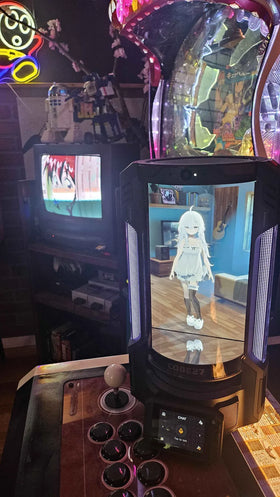
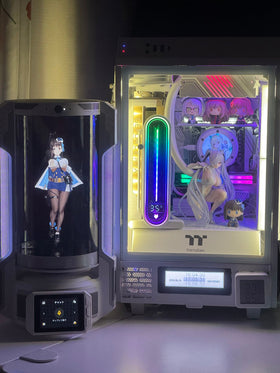
A favorite anime-style character can look great in an illustration or wallpaper. But what changes when that character appears on your desk, blinks, moves, responds to your voice, and seems to occupy a space of its own?
The appeal of a desktop waifu display goes beyond showing a character on another screen. Facial expressions help communicate personality, movement makes the character less static, and 3D depth can give the scene a stronger sense of space. Interaction adds another dimension when the character responds to something you do or say.
These effects don't all require AI, and different displays deliver them in different ways. Understanding motion, expression, depth, and interaction helps you judge what you're seeing—and whether a specialized display suits your needs.
What Is a Desktop Waifu Display?
A desktop waifu display presents an anime-style or customizable virtual character in a desktop environment. The character might appear in a window on your computer, through animated desktop software, or on a dedicated device beside your monitor.
The display format determines where you see the character. Animation and interaction determine what the character can do once it's there.
A static portrait stays still; an animated character can blink or react through predefined motions without AI. An AI-enabled character may respond conversationally but have little animation. Visual detail and conversational ability are separate capabilities.
If you're comparing screen pets, AI desktop assistants, and dedicated hardware, the Desktop Waifu Guide covers those categories. Here, the focus is on what makes a character visually expressive and responsive once it's on screen.
How Do Animation and 3D Change the Character You See?
A character doesn't need constant movement to be visually engaging. Small, well-timed changes can matter more than an endless series of dramatic animations. The key elements are facial expressions, body movement, and how the character occupies a virtual space.
Facial Expressions and Character Personality
A blink, a change in gaze, or a subtle smile makes a character's face less like a fixed illustration. Expressions also distinguish personalities: one character might react with exaggerated surprise, while another uses restrained changes around the eyes and mouth.
The result depends on which expressions the model contains and which ones the software can animate. A model may support blinking, smiling, and mouth movement separately. If the required expression data is missing or incorrectly configured, a display may show limited reactions even when its software offers more options. An impressive model preview therefore doesn't guarantee that every expression will work after import.
Character Motion and Lip-Sync
Body movement provides cues beyond the face. Idle behaviors such as breathing, shifting posture, or glancing around create movement between conversations. Gestures can accompany greetings and replies.
An idle animation plays without new input. A triggered animation follows a click, touch, or supported action. A conversation animation may coordinate gestures and facial changes with speech. All three can be scripted; their presence alone doesn't establish how advanced the AI is.
Lip-sync matters because viewers naturally compare speech with mouth movement. A basic system may open and close the mouth while audio plays; a more detailed one may use different mouth shapes or timing information. The quality depends on the voice output, animation system, and model's available expressions.
3D Depth, Lighting, and Virtual Spaces
A character's shape, virtual camera, lighting, and background affect its apparent depth. If the camera is too far away, facial expressions may be difficult to read; if the scene is poorly framed, gestures may be cut off. Lighting changes how clearly the character stands out from its surroundings.
Three adjustments that may look similar in a demonstration are actually different:
- Virtual camera adjustment: Changing zoom or viewing angle within the digital scene. The physical display stays in place.
- Changing your viewing position: Moving to another place in front of the display. Whether the depth effect changes or remains convincing depends on the display and its viewing limits.
- Physical device rotation: Turning the actual display, manually or with a compatible accessory. This doesn't necessarily change the virtual camera view.
An ordinary monitor can render a 3D character with perspective, animation, and lighting. A specialized depth-enhanced display may offer a different sense of spatial separation, but the result depends on its technology and viewing conditions. Visual depth is not the same as a free-space volumetric hologram: the character remains part of the display system.
What Makes an Anime Character Feel Interactive?
A character feels interactive when its behavior responds to something the user does, rather than simply playing an animation on a loop. A click-triggered gesture may be interactive even if it is predefined, while a conversational character may generate a new reply based on what the user says. Look at whether the reaction fits the input, rather than judging interactivity by the number of visible movements.
Visual responsiveness is not the same as conversational intelligence. A character can offer expressive reactions without reliably understanding complex questions or remembering previous conversations.
How to Evaluate a Desktop Waifu Display in Action
To evaluate a desktop waifu display, watch an ordinary session, including moments when the user isn't actively speaking. Focus on three things you can observe directly.
| What to check | What to observe | Why it matters |
|---|---|---|
| Idle behavior | Does the character show varied movement or repeat the same short sequence? | Helps you judge whether idle motion becomes repetitive during everyday use |
| Voice and animation | Does mouth movement track the speech, while expressions and gestures fit the character’s reply? | Helps you spot noticeable lip-sync or gesture mismatches |
| Scene and display | When supported camera or scene settings change, does the character remain clear and properly framed? | Helps reveal cropping, obstruction, or limited views |
A useful demonstration includes the full sequence from user input to character response: you hear the question, see the reaction, and observe how it finishes. Watch whether the character returns naturally to an idle state or continues an animation after the situation changes.
If the display offers virtual camera or background controls, test only the adjustments it actually supports. A different zoom level may improve facial detail, while a new background could make an outfit less visible. For a custom 3D avatar, check the same model or one with comparable expression and animation data; an official demonstration character may be more fully configured.
For a depth-enhanced display, look for footage of the actual device from a normal seated position, with the virtual camera held still. Check whether the character remains clear as the recording camera changes position. An uncut recording that includes user input and the device’s response helps you judge interaction, even when it is not a live broadcast. A software screen capture shows the rendered scene, but cannot reproduce the full viewing experience of the physical display. If a simple animated character already meets your needs, extra hardware may offer little practical benefit.
How CODE27 Brings a 3D Waifu Into a Desktop Setup
The CODE27 3D Companion Hub provides a dedicated display for virtual characters called Codies. Its depth-enhanced visual system presents a 3D character in a virtual environment, with supported animations, facial expressions, and voice interaction. This is a display-based depth effect, not a person projected freely into open air.
CODE27 offers multiple virtual environments, or Codie Spaces. According to the Companion Hub support guide, users can switch available scenes and adjust the virtual camera's zoom and pitch in Chat Mode. Those settings alter framing within the digital space; they don't physically rotate the device.
The Codie Management System also offers Animation Style for body-language presentation and Expressiveness settings from Subtle to Strong. Supported interactions can combine character gestures, facial animation, and automatic lip-sync.
For imported characters, CODE27 supports compatible standard humanoid VRM models and checks their expression data during import. Its Inside CODE27 technical guide explains how human-performed motion-capture animations, automatic lip-sync, and standard VRM expressions work with these models. Results still depend on the character's rig and expression setup; advanced ARKit 52 facial support remains in development.
For supported user input, the Hub offers voice conversation and virtual-hand interaction. The visible reaction depends on the active mode and character model. A visually expressive Codie doesn't necessarily have stronger AI reasoning or unlimited memory; real-time AI conversations depend on network connectivity and cloud services.
Is a Dedicated Waifu Display Worth Considering This Black Friday?
A dedicated display is most relevant if you regularly want a virtual character visible in its own physical desktop space. If you mainly use a wallpaper, lightweight animation, or occasional character-chat window, extra hardware may provide limited value.
If facial expressions, visible motion, and a depth-enhanced character environment are important to you, consider the available desk space, viewing position, network requirements, and character compatibility before buying.
For the U.S. market, CODE27's planned Black Friday promotion runs November 1–30, 2026:
- CODE27 3D Companion Hub: $509, compared with the $599 reference price — save $90.
- CODE27 3D Companion Hub + Smart Rotating Base bundle: $628, compared with the $748 reference price — save $120.
The optional Smart Rotating Base physically changes the Hub's direction. CODE27's base support guide documents manual rotation and system-controlled face tracking under suitable conditions. This is distinct from adjusting the camera within a Codie Space. The base can also provide battery power to the Hub.
Choose the bundle if rotation or battery-powered flexibility suits your setup, not simply because the stated savings are larger. These are planned promotional prices, not current checkout offers. Check the final price, eligibility, shipping, and after-sales terms before ordering.
Desktop Waifu Display FAQs
Can a desktop waifu display use Live2D and VRM models interchangeably?
Not automatically. Live2D typically uses rigged 2D assets, while VRM stores a 3D humanoid model. A system supporting one format may not support the other, and switching may require separately prepared assets. CODE27 supports compatible standard humanoid VRM imports, not universal Live2D file imports.
Can a desktop waifu keep animating without an active AI conversation?
Yes, if its software supports idle or ambient animations. A character can blink or shift posture without generating a reply. CODE27's documented Ambient Mode includes relaxed idle activities, with behavior depending on the selected mode.
Can a 3D waifu move without motion-capture equipment?
Yes. Motion capture can be used to create animation assets, but users don't need that equipment to play compatible animations. CODE27 provides a library of previously motion-captured movements for supported humanoid characters.
Can you change the viewing angle or virtual background of a desktop waifu?
Some applications provide virtual camera and scene controls. CODE27 supports scene selection plus camera zoom and pitch adjustments. These controls don't physically rotate the hardware or guarantee the same depth effect from every seating position.
Why do some imported VRM characters show limited facial expressions?
A model may lack required expression shapes, have incomplete mappings, or use controls the software doesn't support. CODE27 supports standard VRM expressions and offers an import compatibility check; more advanced ARKit 52 expression support remains in development.
Conclusion: Bring Your Favorite Character Into View
A desktop waifu experience depends on more than whether a character appears on screen. Facial expressions, movement, lip-sync, depth, and responsive interaction each affect how the character looks and behaves. Choose the display that delivers the experience you actually want, without paying for features you won't use.
Want to see your favorite virtual character in a dedicated 3D setting? Explore the CODE27 3D Companion Hub and discover how character motion, expression, and display depth come together on your desk.